What is Android Enterprise?
Android has evolved far beyond being a consumer mobile operating system. Today, it powers millions of business devices across industries, with an estimated 3.9 billion active Android users in over 190 countries and nearly 70% of the global mobile operating system market share [1]. As organizations increasingly rely on Android devices to support day-to-day operations, securely managing them has become a business priority.
However, managing a growing fleet of Android devices isn't always straightforward. Different device manufacturers, Android versions, ownership models, and security requirements can quickly make deployment and management complex. As businesses adopt company-owned devices, BYOD programs, rugged devices, and dedicated kiosks, IT teams need an efficient way to deploy applications, enforce security policies, and maintain compliance at scale.
In this blog, we will explore what Android Enterprise is, how it works, why businesses use it, its key features and deployment models, and how an Android Enterprise-compatible MDM solution helps simplify Android device management at scale.
What is Android Enterprise?
Android Enterprise is Google's official enterprise mobility platform that enables organizations to securely deploy, manage, and protect Android devices used for work. It extends the Android operating system with enterprise-specific management capabilities, allowing IT administrators to configure devices remotely, separate work and personal data, deploy applications, enforce security policies, and manage thousands of devices from a centralized console.
Unlike standard Android, Android Enterprise is built specifically for business use. It provides a consistent set of management APIs and security features that work across supported Android devices, making enterprise mobility easier regardless of the device manufacturer.
Android Enterprise works alongside an Enterprise Mobility Management (EMM) or Mobile Device Management (MDM) solution. While Android Enterprise provides the management framework and APIs, the MDM platform gives IT teams the interface to enroll devices, apply policies, distribute applications, monitor compliance, and perform remote management tasks.
By standardizing Android device management across different manufacturers and device types, Android Enterprise helps businesses strengthen endpoint security, simplify application deployment, and provide employees with a secure and consistent user experience from day one.
Why Did Google Introduce Android Enterprise?
Before Android Enterprise was introduced, managing Android devices across an organization was often inconsistent and challenging. As businesses adopted Android smartphones and tablets for work, Enterprise Mobility Management (EMM) and Mobile Device Management (MDM) vendors struggled to deliver a consistent management experience because each Android manufacturer implemented enterprise management features differently.
The biggest challenge was the lack of standardized Application Programming Interfaces (APIs). Since Android is open source, manufacturers often developed their own management capabilities, resulting in inconsistent security controls and device management features across different Android devices. This created several challenges for organizations:
- Device management capabilities varied between manufacturers.
- Security policies couldn't be applied consistently across all Android devices.
- MDM vendors had to build separate integrations for different OEMs.
- Managing large Android deployments became more complex and time-consuming for IT teams.
To address these challenges, Google introduced Android for Work in 2014 alongside Android 5.0 Lollipop. It provided a standardized set of enterprise APIs and management capabilities that MDM solutions could use to securely manage Android devices, regardless of the manufacturer.
Over time, Android for Work evolved into Android Enterprise, adding new enrollment methods, stronger security controls, improved device provisioning, and support for modern deployment models. Today, Android Enterprise provides a consistent framework that helps organizations:
- Deploy and enroll Android devices faster.
- Apply security policies consistently across devices.
- Distribute and manage business applications remotely.
- Protect corporate data while supporting different ownership models.
- Simplify Android device management at any scale.
Today, Android Enterprise serves as the foundation of Android device management, enabling organizations to securely manage Android devices across different manufacturers, device types, and business use cases through a consistent and standardized management framework.
Why is Android Enterprise Needed?
Android devices have become an integral part of modern business operations, from employee smartphones and rugged handhelds to kiosks, tablets, and POS systems. As organizations deploy more Android devices, they need a secure and consistent way to configure, manage, and protect them throughout their lifecycle.
Android Enterprise provides that foundation by standardizing Android device management. It simplifies administration, strengthens security, and enables IT teams to manage devices consistently across the organization.
Here are some of the key reasons why businesses need Android Enterprise:
- Strengthens Enterprise Security: Protects corporate data with built-in security capabilities such as Work Profiles, device encryption, Managed Google Play, strong authentication, and centralized policy enforcement.
- Simplifies Device Deployment: Supports modern enrollment methods like Android Zero-touch Enrollment, QR code provisioning, Token-based enrollment, allowing devices to be automatically configured with the required apps, settings, and security policies.
- Ensures Consistent Device Management: Applies standardized security policies, application restrictions, network settings, and compliance rules across every managed Android device, regardless of the manufacturer.
- Supports Different Business Requirements: Supports employee-owned devices, company-owned devices, rugged devices, and dedicated-purpose devices while maintaining consistent security and management controls.
- Reduces IT Workload: Automates routine tasks such as device enrollment, application management deployment, policy updates, and remote management, reducing manual effort for IT teams.
- Improves Employee Productivity: Delivers ready-to-use devices with the required applications and settings, enabling employees to get started quickly with minimal IT support.
In short, Android Enterprise provides a secure and scalable way to manage Android devices. When paired with an Android Enterprise-compatible MDM solution, it helps organizations maintain security, simplify IT operations, and improve workforce productivity.
Android Enterprise vs MDM: What's the Difference?
One of the biggest misconceptions is that Android Enterprise and Mobile Device Management (MDM) are the same thing. While they work together, they serve different purposes.
Think of Android Enterprise as Google's enterprise management framework for Android devices, while an MDM solution is the management platform that uses this framework to configure, secure, and control devices.
Android Enterprise provides the enterprise APIs, security features, and management capabilities built into the Android operating system. Features such as Work Profiles, Managed Google Play, Zero-touch Enrollment, and policy enforcement are all made possible through Android Enterprise.
An MDM solution provides the centralized dashboard where IT administrators use these capabilities to enroll devices, deploy applications, enforce security policies, monitor compliance, troubleshoot issues remotely, and manage devices throughout their lifecycle.
In simple terms, Android Enterprise provides the capabilities, while an MDM solution puts them into action.
Rather than replacing each other, Android Enterprise and MDM complement one another, helping organizations securely deploy, manage, and scale Android devices while simplifying day-to-day IT operations.
Who Can Use Android Enterprise?
Android Enterprise is designed for organizations of all sizes that use Android devices for work. Whether you're managing a handful of employee smartphones or thousands of business-critical devices across multiple locations, it provides a standardized way to deploy, secure, and manage Android devices.
If your employees use Android devices to access business applications or corporate resources, Android Enterprise can help simplify device management while strengthening security.
Getting started with Android Enterprise is straightforward. You'll need:
- A Google account to register your organization with Android Enterprise.
- An Android Enterprise environment to enable enterprise management features.
- An Android Enterprise-compatible Mobile Device Management (MDM) solution, such as Quantem MDM, to enroll devices, deploy applications, enforce security policies, and manage devices remotely.
Once everything is set up, IT administrators can securely manage Android devices from a centralized dashboard, regardless of where the devices or users are located.
How Does Android Enterprise Work?
Android Enterprise works together with an Android Enterprise-compatible Mobile Device Management (MDM) solution to simplify device deployment, application management, security, and ongoing administration. Once integrated, IT teams can remotely manage Android devices throughout their entire lifecycle.
Here's how the process works:
Step 1: Register for Android Enterprise
Register your organization with Google using a dedicated enterprise Google account. This creates your Android Enterprise environment and enables enterprise management capabilities.
Step 2: Connect an MDM Solution
Link your Android Enterprise environment with an MDM solution, such as Quantem MDM. The MDM platform provides the centralized dashboard for enrolling devices, deploying applications, enforcing policies, and monitoring compliance.
Step 3: Configure Managed Google Play
Set up Managed Google Play to approve, distribute, and manage business applications. Administrators can remotely deploy approved public and private apps without requiring manual installation.
Step 4: Enroll Android Devices
Enroll devices using the appropriate Android Enterprise deployment method. During enrollment, devices automatically receive the required applications, security policies, Wi-Fi settings, and other configurations.
Step 5: Apply Security Policies
Configure policies such as password requirements, device encryption, application restrictions, network settings, and kiosk mode. These policies are automatically enforced across all enrolled devices.
Step 6: Manage Applications
Install, update, configure, or remove business applications remotely through Managed Google Play, ensuring employees always have access to approved apps.
Step 7: Monitor and Maintain Devices
Continuously monitor device health, compliance, security status, and application inventory from the MDM dashboard. If a device is lost, compromised, or becomes non-compliant, administrators can take immediate action remotely.
By combining Android Enterprise with an MDM solution like Quantem MDM, organizations can securely deploy, manage, and maintain Android devices from a single dashboard throughout their lifecycle.
Key Features of Android Enterprise
Android Enterprise offers a wide range of enterprise features that help organizations securely deploy, manage, and protect Android devices. These capabilities simplify device management, strengthen security, and improve the overall user experience.
Here are some of the key features of Android Enterprise:
1. Work Profile
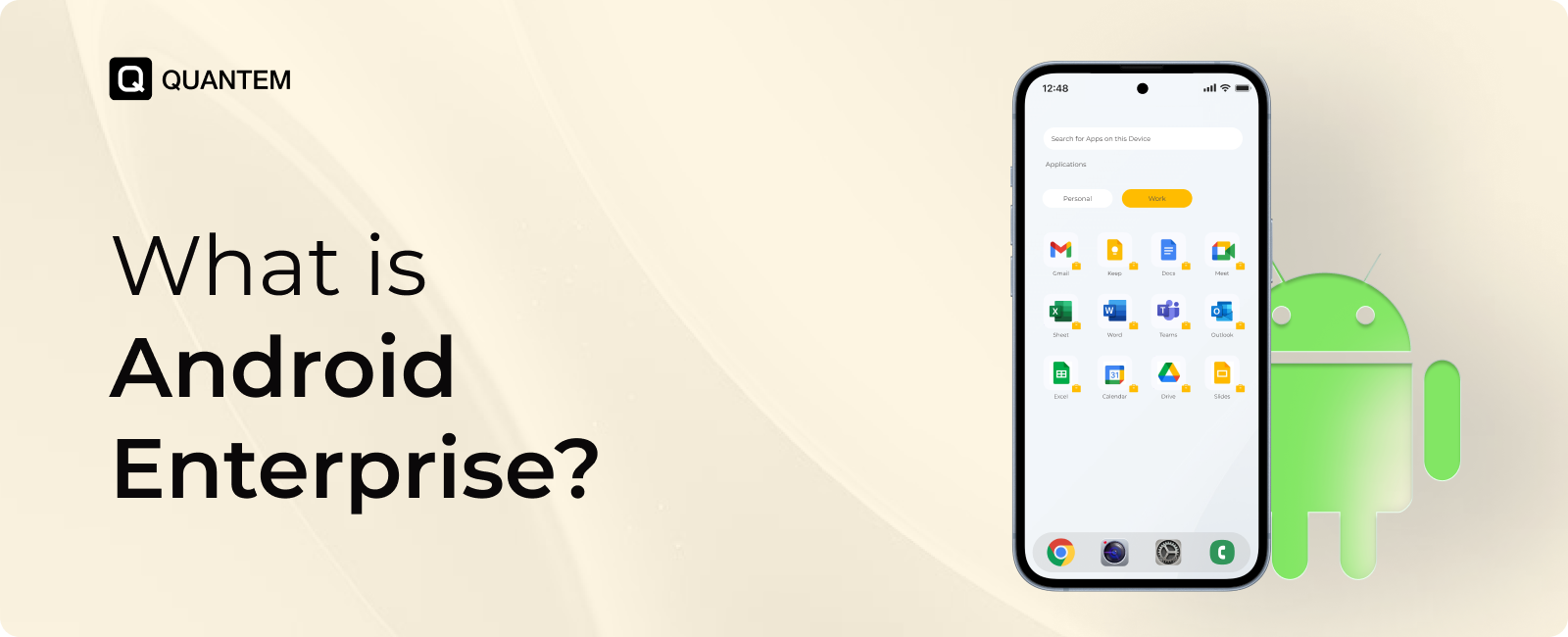
Work Profile creates a separate workspace on an employee's personal device, keeping business apps and data isolated from personal content. IT teams can manage corporate resources without accessing personal photos, messages, contacts, or applications, ensuring both security and employee privacy.
2. Managed Google Play
Managed Google Play is Google's enterprise app store that allows IT administrators to approve, distribute, and manage business applications. Public and private apps can be remotely deployed and updated without requiring manual installation.
3. Multiple Device Management Modes
Android Enterprise supports different deployment models, including BYOD, COPE, Fully Managed Devices, and Dedicated Devices. This flexibility allows organizations to choose the management approach that best suits their workforce and business requirements.
4. Zero-touch Enrollment
Android Zero-touch Enrollment automates device provisioning by enrolling and configuring supported devices during the initial setup. Employees simply connect to the internet, and the required apps, settings, and security policies are applied automatically.
6. Centralized Security Policy Management
IT administrators can remotely enforce password policies, encryption, Wi-Fi and VPN settings, application restrictions, hardware controls, and compliance policies across all managed Android devices from a centralized dashboard.
7. Remote Application Management
Applications can be remotely installed, configured, updated, or removed through an MDM solution. Administrators can also assign apps to specific users, departments, or device groups, ensuring employees always have access to approved business applications.
8. Regular Security Updates
Android Enterprise supports regular Android security patches and OS updates to help protect devices from newly discovered vulnerabilities. Combined with an MDM solution, organizations can monitor update status and maintain compliance more efficiently.
9. Enhanced Data Protection
Built-in security features such as device encryption, Verified Boot, secure authentication, application isolation, and Work Profiles help protect sensitive corporate data. If a device is lost or an employee leaves, administrators can remotely lock the device or wipe corporate data.
10. Remote Device Management
Android Enterprise enables IT teams to remotely monitor device health, deploy applications, update configurations, troubleshoot issues, and enforce policies without requiring physical access to the device.
Together, these features make Android Enterprise a powerful foundation for modern Android device management. When combined with a compatible MDM solution like Quantem MDM, organizations can securely manage Android devices at scale while delivering a consistent user experience.
Business Benefits of Android Enterprise
Android Enterprise goes beyond securing and managing Android devices. It helps organizations reduce IT effort, improve employee productivity, lower operational costs, and get more value from their Android device investments.
Here are five key business benefits of Android Enterprise:
1. Maximize ROI on Your Android Device Fleet
Android Enterprise helps businesses get more value from their Android devices by automating routine management tasks, reducing downtime, and simplifying maintenance. With centralized management and remote administration, organizations can extend device lifecycles while reducing the time IT teams spend on day-to-day support.
2. Lower the Total Cost of Ownership (TCO)
Managing Android devices involves ongoing costs such as provisioning, maintenance, troubleshooting, and software updates. Android Enterprise reduces these costs through automated enrollment, remote management, and over-the-air policy and application updates, minimizing manual effort and IT support requirements.
3. Boost Employee Productivity
Employees can start working immediately with devices that are pre-configured with the required applications, settings, and security policies. Automatic app updates and seamless access to business resources reduce interruptions, allowing employees to stay focused on their work.
4. Simplify IT Operations
Android Enterprise centralizes device enrollment, application management, policy enforcement, and security administration into a single framework. By automating routine tasks, IT teams can spend less time managing devices and more time supporting strategic business initiatives.
5. Scale Device Management as Your Business Grows
Whether you're onboarding new employees or expanding to new locations, Android Enterprise makes it easy to manage growing device fleets. IT administrators can remotely deploy applications, apply consistent policies, and maintain security across all Android devices from a centralized platform.
Does Quantem MDM Support & Integrate with Android Enterprise?
Absolutely. Quantem MDM is fully compatible with Android Enterprise, enabling businesses to take advantage of Google's enterprise management framework while simplifying everyday device administration. From employee-owned smartphones to fully managed corporate devices and dedicated kiosks, Quantem gives IT teams a single platform to deploy, secure, and manage every Android device with ease.
By integrating Android Enterprise with Quantem MDM, organizations can automate device enrollment, distribute applications through Managed Google Play, enforce security policies, monitor compliance, and remotely manage devices throughout their lifecycle. This allows businesses to adopt the deployment model that best fits their workforce without sacrificing security, visibility, or administrative efficiency.
Android Enterprise Deployment Models Supported by Quantem
No matter how your Android devices are deployed, Quantem streamlines their management from a single dashboard. IT administrators can onboard devices, deploy applications, enforce security policies, and maintain compliance throughout their lifecycle. Whether you are managing BYOD, company-owned devices, or dedicated kiosks, Quantem simplifies Android Enterprise management.
References:
1. bankmycell
Experience Android Enterprise Management at Its Best with Quantem.
Frequently Asked Questions (FAQs)
1. Is Android Enterprise free?
Yes. Google offers Android Enterprise as part of the Android platform, so there is no separate fee to use its enterprise capabilities. However, businesses typically pair Android Enterprise with a compatible MDM solution to enroll devices, enforce security policies, distribute applications, and manage devices efficiently.
2. Is Android Enterprise the same as MDM?
No. Android Enterprise and MDM serve different purposes. Android Enterprise is Google's enterprise mobility framework that provides built-in management features for Android devices. An MDM solution uses those capabilities to help IT teams configure devices, deploy apps, apply security policies, and monitor device compliance from a centralized console.
3. Can Android Enterprise manage employee-owned devices in BYOD environments?
Yes. Android Enterprise is designed to support BYOD (Bring Your Own Device) environments through Work Profiles. This feature creates a secure workspace for business apps and data, allowing employees to use the same device for work and personal activities while keeping both environments separate.
4. Does Android Enterprise require Google Workspace?
No. A Google Workspace subscription is not required to use Android Enterprise. Organizations can register for Android Enterprise using a Google account and then connect it to an Android Enterprise-compatible MDM solution to begin managing Android devices.
5. What is the difference between Android Enterprise and Android Device Policy?
Android Enterprise is the overall framework that enables enterprise management on Android devices. Android Device Policy is the application that helps apply and enforce those management policies on enrolled devices. In simple terms, Android Enterprise provides the management capabilities, while Android Device Policy helps implement them on the device.
6. Which MDM works with Android Enterprise?
Many enterprise mobility solutions support Android Enterprise, including Quantem MDM. An Android Enterprise-compatible MDM allows organizations to automate device enrollment, manage applications through Managed Google Play, enforce security policies, monitor compliance, and remotely manage Android devices throughout their lifecycle.
7. How does Android Enterprise integration with an EMM solution help manage the lifecycle of fully managed devices?
Integrating Android Enterprise with an EMM solution allows IT teams to manage corporate-owned fully managed devices from enrollment to retirement. Administrators can remotely configure devices, deploy apps, enforce security policies, monitor compliance, and wipe or retire devices when needed, all from a centralized dashboard.
8. What is Android Enterprise Recommended (AER)?
Android Enterprise Recommended (AER) is Google's certification program for Android devices, EMM/MDM solutions, and service providers that meet its enterprise standards. It helps businesses identify products that offer reliable performance, regular security updates, and full support for Android Enterprise features, including Managed Google Play accounts for secure application deployment and management.



Get the latest blogs directly delivered to your mail fly arrow